



About UsPricingReviewsContact UsClient Portal loginBook a Free 30-Min Call
Last updated: October 18, 2026
TL;DR:
- A T4 reports employment income paid to employees, while a T4A accounts for non-payroll income such as pensions and contractor fees. Proper classification and timely, accurate filing of both slips are essential to avoid penalties and CRA audits. Employers and payers must adhere to strict deadlines and reporting rules to maintain compliance and ensure correct income reporting on tax returns.
A T4 reports employment income paid to an employee, while a T4A reports non-payroll income such as pensions, self-employment commissions, and fees for services. The Canada Revenue Agency (CRA) sets out distinct rules for each slip, and T-Ledgers works with Canadian businesses and contractors daily to make sure the right slip reaches the right person.
Who issues what and who receives what:
Employers issue a T4 (Statement of Remuneration Paid) to every employee paid $500 or more in a calendar year, or to any employee from whom CPP, EI, or income tax was withheld regardless of the amount.
Payers (businesses, trustees, executors, administrators) issue a T4A (Statement of Pension, Retirement, Annuity, and Other Income) when they pay non-employment amounts such as self-employment commissions, fees for services, pensions, or RESP payments.
Recipients report T4 amounts as employment income and T4A amounts on the applicable lines for business, pension, or other income on their personal tax return.
Pro Tip: The single most common misclassification mistake is treating a contractor as an employee or vice versa. Issuing the wrong slip can trigger CRA follow-up, remittance corrections, and penalties. When worker status is genuinely unclear, request a CRA ruling before year-end.
What are the most common filing mistakes and how do you fix them?
Why getting the right slip right matters more than most people realise
T-Ledgers makes year-end slip filing straightforward for Canadian businesses
The T4, officially called the Statement of Remuneration Paid, is the slip employers use to report all amounts paid to employees during a calendar year. If you run payroll in Yukon or anywhere else in Canada, the T4 is your primary year-end document for every person on your payroll.
Payments reported on a T4 include:
Salary, wages, and hourly pay
Bonuses, commissions paid through payroll, and overtime
Taxable benefits (employer-paid group benefits, personal use of a company vehicle, housing allowances)
Vacation pay and statutory holiday pay
Employer-paid CPP and EI contributions where applicable
Payroll deductions that appear on a T4:
Box 14: Total employment income
Box 16: Employee’s CPP contributions (line 30800 on the tax return)
Box 18: Employee’s EI premiums (line 31200 on the tax return)
Box 22: Income tax deducted (line 43700 on the tax return)
Box 52: Pension adjustment (affects RRSP contribution room)
Employers must withhold CPP, EI, and income tax from each pay, remit those amounts to the CRA on schedule, and then report the totals on the T4 at year-end. You must issue a T4 if you paid an employee $500 or more during the calendar year, or if you withheld CPP, EI, income tax, or QPIP even when total earnings were under $500.
Filing and distribution timeline:
Distribute T4 slips to employees by the last day of February following the calendar year.
File the T4 return (slips plus T4 Summary) with the CRA by the same last-day-of-February deadline.
Electronic filing is required when you issue more than five slips of the same type.
Keep copies of all slips and the summary for your records.
The T4 filing deadline guide from T-Ledgers walks through the electronic filing thresholds and what happens when you miss the deadline.

The T4A, officially the Statement of Pension, Retirement, Annuity, and Other Income, covers a broad range of non-payroll payments. Where the T4 is tightly focused on employment, the T4A covers income types that do not fit the standard payroll relationship.
Common payments reported on a T4A:
Pensions and annuities (box 016 and box 024)
Self-employment commissions (box 20)
Fees for services (box 48)
RESP accumulated income payments and educational assistance payments
RDSP payments
Research grants and scholarships
Death benefits and retiring allowances
Who must issue a T4A:
Payers include businesses paying contractors or commissioned agents, pension plan administrators, RESP and RDSP trustees, executors and estate administrators, and corporate directors paying fees. The general reporting threshold is a certain amount in a calendar year for most payment types, though some codes carry a lower threshold (such as RESP accumulated income payments).
Box 20 reports self-employment commissions and box 48 reports fees for services. Both amounts must be reported net of GST/HST on the recipient’s tax return. The T4A slip itself does not show GST/HST separately — the payer reports the gross amount, and the recipient nets out the GST/HST component when reporting business income on Form T2125.
Pro Tip: Most T4A payments do not require the payer to withhold income tax at source. Exceptions exist for certain pension payments and lump-sum amounts where the CRA may require withholding. When in doubt, check RC4157 for the specific payment type before assuming no withholding is needed.
Common T4A boxes at a glance:
| Box | Description | Tax-return line |
|---|---|---|
| 016 | Pension or superannuation | Line 11500 |
| 020 | Self-employment commissions | Form T2125 (net of GST/HST) |
| 024 | Annuities | Line 11500 or 13000 |
| 028 | Other income | Line 13000 |
| 048 | Fees for services | Form T2125 (net of GST/HST) |

Distribution and filing deadlines mirror the T4: slips to recipients and the T4A return to the CRA by the last day of February. Electronic filing is required when you issue more than five T4A slips.
The T4 vs T4A comparison comes down to the nature of the relationship between payer and recipient, not just the dollar amount.
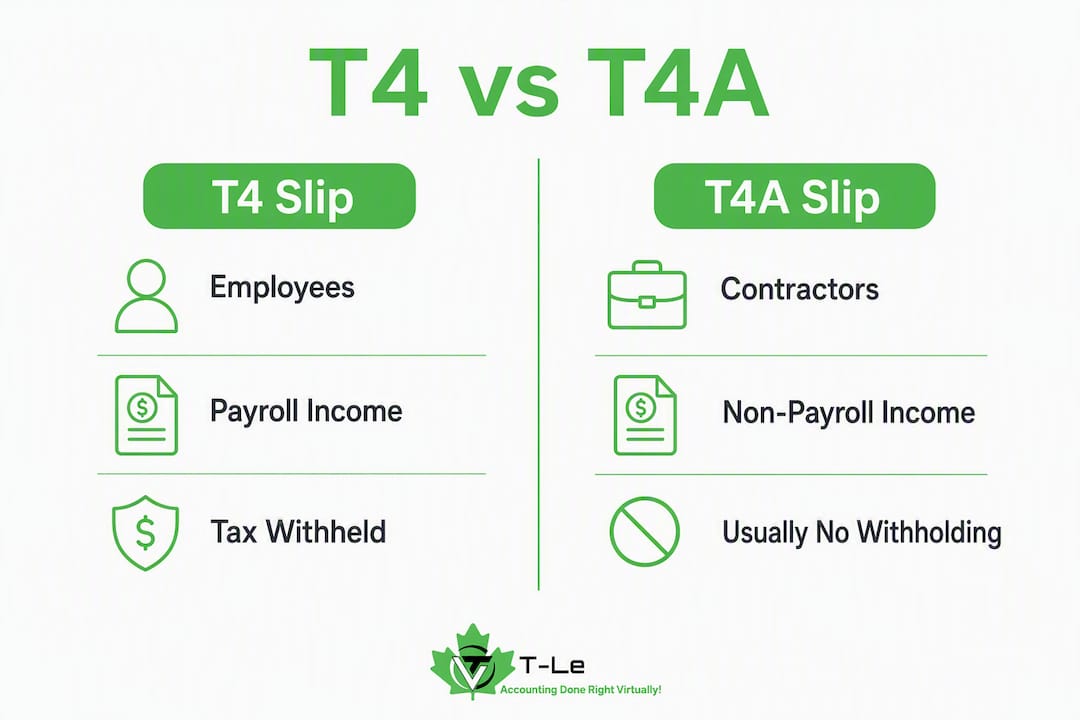
| Dimension | T4 | T4A |
|---|---|---|
| Who receives it | Employees | Contractors, pensioners, annuity recipients, grant recipients |
| Who issues it | Employers | Businesses, trustees, executors, administrators, directors |
| Types of income | Salary, wages, taxable benefits, payroll commissions | Pensions, self-employment commissions, fees for services, RESP/RDSP, grants |
| Withholding (CPP/EI/tax) | Required — employer withholds and remits | Generally not required; exceptions for some pension/lump-sum payments |
| Key boxes | 14 (employment income), 16 (CPP), 18 (EI), 22 (tax deducted) | 016 (pension), 020 (commissions), 024 (annuities), 048 (fees for services) |
| Tax-return lines | Box 14 → line 10100; Box 22 → line 43700 | Box 016 → line 11500; Box 020/048 → Form T2125 |
| Deadline | Last day of February | Last day of February |
| Electronic filing | Required for more than five slips | Required for more than five slips |
| Amendment process | Amended T4 slip + T4 Summary amendment | Amended T4A slip + T4A Summary amendment |
Practical illustration:
A Yukon retail worker paid $52,000 in wages receives a T4. CPP, EI, and income tax were withheld from every paycheque and appear in boxes 16, 18, and 22.
A graphic designer invoicing that same retailer for $8,000 in design fees receives a T4A with box 48 completed. No CPP or EI was withheld. The designer reports the amount net of GST/HST on Form T2125 and remits GST/HST separately through their GST/HST account.
Misclassification risk: Issuing a T4A to someone who should legally be an employee means CPP and EI contributions were never withheld or remitted. The CRA can reassess both the employer and the worker, and the employer may owe the full employer and employee share of CPP plus interest and penalties.
The CRA uses a four-part test to determine whether a worker is an employee or an independent contractor. Getting this right determines whether you issue a T4 or a T4A.
CRA employment status factors:
Control — Does the payer control how, when, and where the work is done? More control points to employment (T4).
Ownership of tools — Does the worker supply their own equipment and tools? Worker-owned tools point to contractor status (T4A).
Chance of profit — Can the worker profit by managing their own costs and taking on other clients? Yes points to contractor (T4A).
Risk of loss — Does the worker bear financial risk if the project goes over budget? Yes points to contractor (T4A).
Scenarios:
Regular employee with payroll: A Whitehorse office administrator works set hours, uses employer equipment, and receives a fixed salary. Issue a T4.
Commissioned sales representative through payroll: A sales rep is on payroll, receives a draw against commissions, and has CPP/EI withheld. Issue a T4.
Contractor invoicing for services: An IT consultant invoices monthly, sets their own hours, uses their own laptop, and works for multiple clients. Issue a T4A (box 48).
Pension or annuity recipient: A retired former employee receives monthly pension payments from a company plan. Issue a T4A (box 016).
Scholarship or grant recipient: A student receives a research grant from a university. Issue a T4A (box 028 or the applicable scholarship box).
When both slips apply in the same year: A worker who was an employee for part of the year and then transitioned to contractor status receives both a T4 (for the employment period) and a T4A (for the contractor period). Each slip covers only the applicable period.
Pro Tip: If you are genuinely unsure whether a worker is an employee or contractor, request a CRA ruling using Form CPT1 before year-end. Waiting until after an audit is far more costly than a proactive ruling.
Meeting CRA deadlines and withholding rules is not optional. Here is what you need to do and when.
Deadlines:
Distribute slips to recipients and file the return with the CRA by the last day of February following the calendar year.
Electronic filing is required when you issue more than five slips of the same type; paper filing is only available for five or fewer.
Remit payroll deductions (CPP, EI, income tax) to the CRA on the schedule assigned to your payroll account (regular, quarterly, or accelerated).
Withholding rules:
T4 situations: Always withhold CPP, EI, and income tax from employment income. Remit on schedule.
T4A situations: Generally no withholding required. Exceptions include certain pension payments, lump-sum retiring allowances, and annuity payments where the CRA specifies a withholding rate.
How to correct a slip:
Prepare a corrected slip with the accurate amounts and mark it as amended.
Send the corrected copy to the recipient.
File the amended slip and an amended summary with the CRA.
Keep documentation of the error and the correction.
Pro Tip: Reconcile your payroll software totals against your T4 and T4A amounts at least one month before the February deadline. Catching a discrepancy in January is far less stressful than filing an amendment in March.
Year-end mini-schedule:
| Month | Action |
|---|---|
| November | Run year-to-date payroll reports; confirm all SINs are accurate |
| December | Reconcile payroll deductions against remittances; identify any gaps |
| January | Generate draft T4/T4A slips; review for accuracy before finalising |
| February (last day) | Distribute slips to recipients; file return with CRA |
The 2026 key tax deadlines guide from T-Ledgers lists all payroll and filing dates in one place.
Reporting totals: File a T4 Summary with your T4 slips and a T4A Summary with your T4A slips. The summary reconciles the total amounts on all slips against your remittances. A mismatch between your summary and your remittance records is one of the most common triggers for a CRA payroll review.
Each slip box maps to a specific line on your personal tax return. Using the wrong line is a reportable error that the CRA will flag.
Box-to-return-line mapping:
| Slip | Box | Description | Tax-return line / form |
|---|---|---|---|
| T4 | 14 | Employment income | Line 10100 |
| T4 | 16 | CPP contributions | Line 30800 |
| T4 | 18 | EI premiums | Line 31200 |
| T4 | 22 | Income tax deducted | Line 43700 |
| T4A | 016 | Pension or superannuation | Line 11500 |
| T4A | 020 | Self-employment commissions | Form T2125 (net of GST/HST) |
| T4A | 024 | Annuities | Line 11500 or 13000 |
| T4A | 028 | Other income | Line 13000 |
| T4A | 048 | Fees for services | Form T2125 (net of GST/HST) |
GST/HST and box 20/48: Box 20 and box 48 amounts are reported net of GST/HST on your income tax return. The payer reports the gross amount on the T4A slip, but when you enter the figure on Form T2125, you subtract the GST/HST component you collected. That GST/HST is then reported and remitted separately through your GST/HST return. Keeping your bookkeeping records clean by separating GST/HST from gross income on every invoice makes this netting straightforward.
Pension income: Amounts in box 016 flow to line 11500 (other pensions and superannuation). Eligible pension income may qualify for the pension income tax credit and pension income splitting with a spouse.
Contractor example (box 48): You received a T4A with $12,000 in box 48 for consulting fees. You collected $1,560 in GST/HST on those invoices. On Form T2125, you report $12,000 as gross income, then deduct the $1,560 GST/HST to arrive at $10,440 net business income before expenses. The $1,560 is reported and remitted on your GST/HST return separately.
Pro Tip: Log into CRA My Account before filing to confirm all slips issued to you match what you have in hand. If a slip is missing or shows a different amount, contact the payer first. If the payer does not respond, the CRA can provide a copy of what was filed.
Reporting multiple slips in one year:
Enter each T4 employment income amount on line 10100 (add them together if you had more than one employer).
Enter T4A pension amounts on line 11500.
Report T4A box 20 and box 48 amounts on Form T2125 for each business activity, net of GST/HST.
Claim the income tax deducted from all slips on line 43700.
Frequent errors:
Misclassifying a worker as a contractor when they meet the CRA’s employee criteria, resulting in missing CPP/EI remittances
Missing the last-day-of-February deadline for distributing slips or filing the return
Incorrect or transposed Social Insurance Numbers (SINs) on slips
Reporting gross amounts in box 20 or box 48 without netting out GST/HST on the recipient’s return
Failing to file electronically when issuing more than five slips of the same type
Omitting taxable benefits from box 14 (employer-paid parking, group term life insurance above the exempt threshold)
How to correct a slip:
Identify the error (wrong amount, wrong box, incorrect SIN).
Prepare an amended slip with the corrected information; mark it clearly as amended.
Send the corrected slip to the recipient promptly.
File the amended slip and an amended T4 or T4A Summary with the CRA.
If the error affected the recipient’s tax return, they may need to file a T1 adjustment.
Penalties: Late filing of T4 or T4A returns carries penalties based on the number of slips and the length of the delay. Failing to file electronically when required also attracts a penalty. The consequences of not filing your taxes in Canada article from T-Ledgers covers the penalty structure in detail.
Pro Tip: Run a simple cross-check: total all box 14 amounts across your T4 slips and confirm they match your payroll software’s year-end employment income report. Do the same for CPP (box 16) and EI (box 18) against your remittance records. A mismatch here almost always means an amendment is coming.
Each slip type covers a distinct income category. Knowing which one applies prevents you from reporting income on the wrong line.
T3 — Statement of Trust Income Allocations and Designations:
Issued by trust administrators and estate trustees
Reports income distributed from a trust or estate (interest, dividends, capital gains allocated to beneficiaries)
Does not involve employment or self-employment income
A beneficiary receiving estate distributions gets a T3, not a T4A
T5 — Statement of Investment Income:
Issued by financial institutions, corporations paying dividends, and investment funds
Reports dividends, interest, and foreign income earned on investments
No CPP, EI, or income tax is withheld at source in most cases
A shareholder receiving eligible dividends from a Canadian corporation receives a T5
T4 vs T4A vs T3 vs T5 at a glance:
T4: Employment income with payroll deductions
T4A: Non-payroll income (pensions, commissions, fees, grants)
T3: Trust and estate distributions
T5: Investment income (dividends, interest)
GST/HST and T4A: The T4A slip itself does not include or show GST/HST. For box 20 (self-employment commissions) and box 48 (fees for services), the payer reports the gross amount paid. The recipient must net out the GST/HST component when reporting on Form T2125. No GST/HST appears on T3 or T5 slips.
Receiving multiple slip types in one year is common for freelancers and small business owners. A contractor might receive a T4A for consulting fees, a T5 for savings account interest, and a T3 from an estate they are a beneficiary of. Each slip feeds a different line on the tax return and affects RRSP contribution room and CPP/EI obligations differently. T4A box 20 and box 48 income is self-employment income, which generates CPP contributions (through Schedule 8) but not EI premiums unless the contractor has opted into the EI self-employed programme. T3 and T5 income does not generate CPP or EI and does not affect RRSP contribution room directly.
Key boxes to review on your T4:
Box 14 (employment income): the total gross amount before deductions; this is what flows to line 10100
Box 16 (CPP contributions): must match your remittance records for the employee
Box 18 (EI premiums): capped at the annual maximum; confirm against CRA’s published annual rate
Box 22 (income tax deducted): the total withheld across all pay periods; this is the employee’s credit on line 43700
Box 52 (pension adjustment): reduces the employee’s RRSP contribution room for the following year
Key boxes to review on your T4A:
Box 016 (pension): confirm the gross pension paid matches plan records
Box 020 (self-employment commissions): gross amount before the recipient nets GST/HST
Box 048 (fees for services): same GST/HST netting rule as box 020
Box 028 (other income): catch-all for amounts not covered by other boxes; confirm the correct box code applies
T-Ledgers’ team of CPAs handles payroll services for Canadian businesses, including year-end slip preparation, reconciliation, and CRA filing. For employers who want oversight of the full compliance cycle, the virtual CFO service covers payroll, remittances, and year-end reporting under one flat-rate arrangement.
Employer year-end checklist:
Confirm every employee and contractor SIN is on file and accurate.
Reconcile payroll software year-end totals against T4 amounts for box 14, 16, 18, and 22.
Confirm all CPP, EI, and income tax remittances match CRA records.
Verify all T4A payments (box 20, 48, 016) against invoices and payment records.
Generate and review draft slips before finalising.
Distribute slips to recipients by the last day of February.
File the T4 return and T4A return (with summaries) with the CRA by the last day of February.
Issue amended slips immediately if any error is discovered after filing.
Pro Tip: Schedule your internal year-end review for mid-January. That gives you two weeks to catch errors and still meet the February deadline without rushing.
A T4 reports employment income with payroll deductions, while a T4A covers non-payroll income such as pensions, commissions, and fees for services, each mapping to distinct lines on the Canadian tax return.
| Point | Details |
|---|---|
| T4 is for employees | Employers issue T4 slips for salary, wages, and taxable benefits; CPP, EI, and income tax are withheld. |
| T4A covers non-payroll income | Payers issue T4A slips for pensions, commissions (box 020), fees for services (box 048), and grants. |
| Box 20 and 48 are net of GST/HST | Recipients report box 020 and box 048 amounts net of GST/HST on Form T2125, not the gross T4A figure. |
| February deadline applies to both | Slips must reach recipients and CRA returns must be filed by the last day of February each year. |
| T-Ledgers handles year-end compliance | T-Ledgers offers flat-rate payroll and virtual CFO services to prepare, reconcile, and file T4 and T4A slips accurately. |
Worker misclassification is the issue I see cause the most downstream pain for small business owners. The instinct is to pay someone as a contractor because it simplifies payroll and avoids CPP and EI contributions. That logic holds when the worker genuinely is a contractor. When it does not hold, the CRA does not split the difference: the employer owes the full employer and employee share of CPP, plus interest, plus potential penalties.
What surprises many clients is that the T4A is not a “simpler” slip. Box 48 (fees for services) in particular creates obligations on both sides. The payer must issue the slip accurately and on time. The recipient must net out GST/HST, report on Form T2125, and potentially make CPP contributions through Schedule 8. A contractor who receives a T4A and simply enters the gross amount on line 13000 has likely under-reported business income and missed a CPP obligation.
The other underappreciated issue is the February deadline. It feels distant in November and arrives faster than expected. Employers who wait until the last week of February to reconcile payroll totals often discover discrepancies they cannot fix in time, which means amendments, which means more CRA correspondence. A mid-January internal review is not a luxury; it is the single most effective way to avoid a stressful February.
Year-end compliance does not have to mean late nights cross-referencing payroll reports. T-Ledgers is a fully remote Canadian accounting firm that handles T4 and T4A preparation, reconciliation, and CRA filing for small businesses and contractors across Canada, including Yukon. The flat-rate pricing model means you know the cost upfront, with no hourly surprises when the February deadline approaches.

T-Ledgers’ CPAs reconcile your payroll totals, confirm withholding and remittances, prepare accurate slips, and file your T4 and T4A returns with the CRA on time. For businesses that want full oversight of payroll and year-end compliance, the virtual CFO service covers the entire cycle. If you need payroll managed on an ongoing basis, the payroll services package handles remittances, slip preparation, and CRA filing under one flat-rate agreement. Contact T-Ledgers today to get your year-end slips filed accurately and on time.
Official CRA guidance:
T4A slip: Information for payers — official CRA page defining T4A payment types, reporting thresholds, and box codes
RC4157: Deducting Income Tax on Pension and Other Income, and Filing the T4A Slip and Summary — CRA guide covering filing methods, deadlines, and amendment procedures
T4A slip: Statement of Pension, Retirement, Annuity, and Other Income (recipient guidance) — CRA box descriptions and tax-return line mapping for recipients
T4 slip: Statement of Remuneration Paid — CRA box descriptions for employees
CRA My Account — retrieve slips and confirm filing status directly with the CRA
T-Ledgers practitioner resources:
T4A requirements for contractors — practical guide on thresholds, issuance timing, and common mistakes
T4 filing deadline guide — deadlines and electronic filing thresholds for employers
Note: CRA pages are primary government sources. T-Ledgers resources are practitioner commentary based on CRA guidance. Always confirm current rules directly with the CRA or a qualified accountant, as thresholds and rules can change.
Recipients can view all slips issued to them by logging into CRA My Account. If a slip is missing or shows an incorrect amount, contact the payer first. The CRA can provide a copy of what was filed if the payer does not respond.
No. A T4 reports employment income paid through payroll, with CPP, EI, and income tax withheld. A T4A reports non-payroll income such as pensions, self-employment commissions, and fees for services, and generally does not include payroll deductions.
Any payer who paid $500 or more in a calendar year for pensions, self-employment commissions, fees for services, RESP payments, or other qualifying amounts must issue a T4A to the recipient and file the return with the CRA by the last day of February.
Not automatically. A T4A reports income on which no tax was withheld at source in most cases, so you may owe tax when you file. The actual amount depends on your total income, deductions, and any instalments already paid. Contractors reporting box 48 income on Form T2125 may also owe CPP contributions through Schedule 8.
Yukon has its own territorial income tax rates that apply on top of federal rates. The combined federal and territorial rate varies by income bracket. The CRA and the Yukon government publish current rates each year; a qualified accountant can calculate your specific liability based on your total income from T4, T4A, and other slips.
Yes. A worker who was an employee for part of the year and a contractor for the rest would receive a T4 for the employment period and a T4A for the contractor period. Each slip is reported on the applicable lines of the tax return independently.
This article provides general information about Canadian tax slip requirements and is not professional tax or legal advice. Confirm current CRA rules and thresholds with the CRA directly or with a qualified accountant before filing.
