
About UsPricingReviewsContact UsClient Portal loginBook a Free 30-Min Call
About UsPricingReviewsContact UsClient Portal loginBook a Free 30-Min Call
Services
Get caught up
Catch-Up BookkeepingFrom $1,800Books & payroll
BookkeepingFrom $350/monthPayrollGet a quoteSR&ED ClaimsEnd-to-end SR&ED claims, quoted after consultationSR&ED for Software CompaniesQuoted after consultationSR&ED-Ready BookkeepingBooks + T2 for SR&ED claimsTax filing
Corporate Tax (T2)From $800 · nil T2 from $249GST/HST Filing$150 per returnPersonal Tax (T1)From $110 · students from $49Sole Proprietor Tax (T1 + T2125)From $300Start & grow
IncorporationFrom $499 + gov feesVirtual CFOFrom $2,500/monthAI Consulting & AutomationFor small businessesIndustries
Construction & tradesConsultantsTech startupsReal estateHealthcareSee all industries →More
PricingService areasAll services →CRA Payroll Account Setup: A Guide for BC Employers
By Wajahat Ajmal
Last updated: October 16, 2026 · Reviewed by Wajahat Ajmal, CPA, FCCA
Quick answer: To set up a CRA payroll account in British Columbia, get a Business Number (BN), then register a payroll (RP) program account online through Business Registration Online or My Business Account, by phone at 1-800-959-5525, or by mailing or faxing Form RC1. You need the account open before your first remittance is due. After that, you deduct CPP, EI and federal and BC income tax from each paycheque and send those amounts to the CRA on your assigned remittance schedule.
Getting your CRA payroll account set up correctly before your first paycheque goes out is one of the most important steps you’ll take as a new employer in British Columbia. Once registered, you’re responsible for deducting Canada Pension Plan (CPP) contributions, Employment Insurance (EI) premiums, and federal and provincial income tax from every employee’s pay, then remitting those amounts to the CRA on schedule.
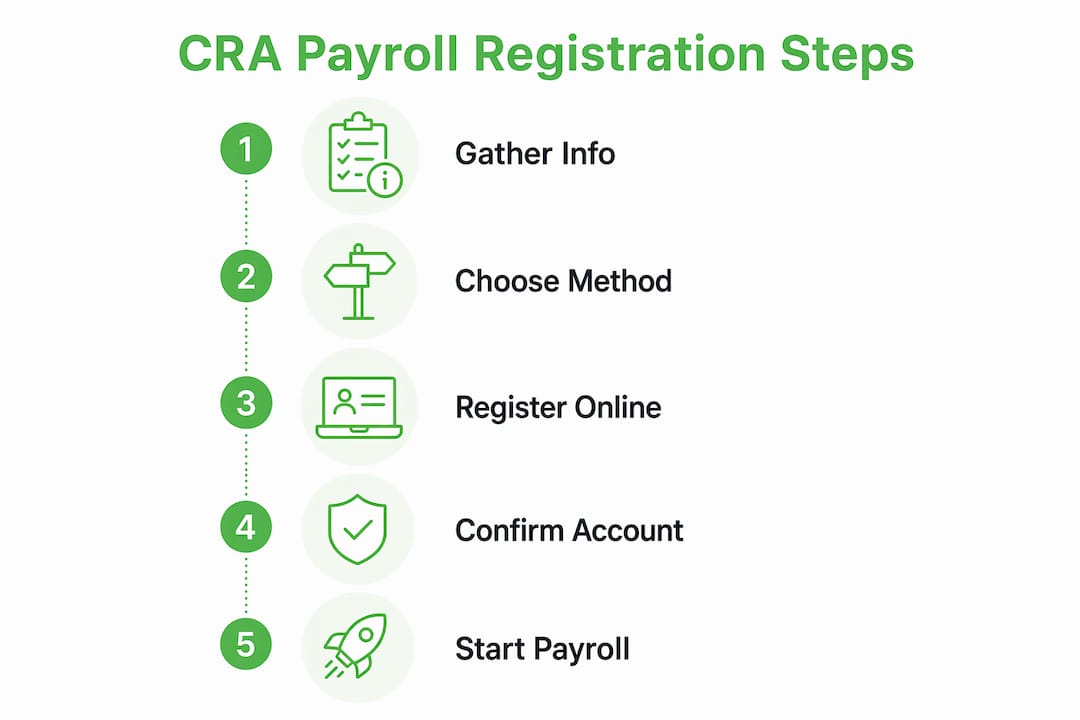
Here’s what you need to have ready before you register:
- Your Business Number (BN): If you don’t have one yet, you’ll get it automatically when you register for your first CRA program account. See our guide to Business Number registration.
- Legal business name and address: Exactly as registered with the province or CRA.
- Contact information: Phone number and mailing address for your business.
- Expected first payroll date: The date you expect to first pay employees.
- Estimated payroll and number of employees: Used to set up your account and remittance details.
- Type of business and industry: Required for CRA classification purposes.
Pro Tip: Gather all of this information before you start the registration process. Having it on hand means you can complete the CRA payroll account setup in a single session without delays.
Does your business actually need a CRA payroll account?
Yes, if you have employees. The CRA requires you to open a payroll program account before your first remittance due date, which in practice means as soon as you start paying employees. Leaving it until after a remittance is due is a common mistake that can lead to penalties.
The key distinction the CRA draws is between employees and independent contractors. If you hire a contractor who invoices you for services, you generally don’t withhold payroll deductions or need a payroll account for that relationship. But if you hire someone as an employee, even part-time or seasonal, you’re an employer the moment that first paycheque is issued. Our guide on employee vs independent contractor status walks through the tests.
Here’s when you need to open a payroll account:
- You hire one or more employees, full-time, part-time, or casual.
- You pay wages, salaries, tips, bonuses, or taxable benefits to workers classified as employees.
- You’re a corporation paying a salary to a director or shareholder-employee.
- You take over an existing business that already has employees on payroll.
- You’re a non-resident employer paying Canadian-source employment income.
One area that trips up BC business owners specifically: if a worker’s status is ambiguous, the CRA can reclassify a contractor as an employee after the fact. That reclassification can make you responsible for the CPP, EI and income tax you should have deducted, plus penalties and interest. When in doubt, confirm the worker’s status using the CRA’s guidelines, or ask the CRA for a ruling, before the first payment goes out.
How do you register for a CRA payroll account?
You can register online, by phone, or by mail or fax. Online registration through Business Registration Online (BRO) or CRA My Business Account is the fastest option and usually gives you your account number right away. Phone registration is quick too, while mail and fax take longer.

← Swipe to compare →
| Method | How to access | Typical timeline | Best for |
|---|---|---|---|
| CRA My Business Account | Sign in at canada.ca with your CRA credentials | Usually immediate | Employers who already have a BN and CRA login |
| Business Registration Online (BRO) | Register online through canada.ca (see the CRA’s how to register page) | Usually immediate | New businesses registering for a BN and RP account at the same time |
| Phone | Call 1-800-959-5525 during business hours | Usually during the call | Employers who prefer speaking with a CRA agent |
| Mail or fax (Form RC1) | Complete Form RC1 and send it to your tax centre | Several weeks | Employers who can’t register online or by phone |
For the online route through CRA My Business Account, you’ll sign in with a CRA user ID and password, a Sign-In Partner (like your bank login), or a provincial partner such as the BC Services Card. Once logged in, choose the option to register a new program account and select payroll (RP). The portal walks you through each field and shows your new account number on screen.
For phone registration, have your BN, legal business name, address, and expected first payroll date ready before you call. The CRA agent can create your RP account during the call and give you your account number.
Form RC1 covers mail and fax registration. Fill it out completely, sign it, and send it to the CRA tax centre that serves your region. Because processing takes several weeks, this method only makes sense if your first payroll is still months away.
Pro Tip: Use the online portal whenever possible. It gives you instant confirmation, lets you view your account number immediately, and sets you up to manage remittances and filings through the same portal going forward.
What’s the difference between RP0001 and RP0002?
Your payroll program account number has 15 characters: your nine-digit Business Number, the letters “RP,” and a four-digit reference number, for example 123456789 RP 0001. Your first payroll account is RP0001. Any additional payroll account you open gets the next number, so RP0002 is simply your second payroll account.
Businesses open a second payroll account for a few reasons. The most common are separate payroll operations, such as divisions or locations that run their own payroll, and a reduced EI premium rate. Employers that offer a qualifying short-term disability (wage-loss replacement) plan can apply to Service Canada for a lower EI employer rate under the EI Premium Reduction Program. The CRA doesn’t allow different EI rates under one payroll account, so each reduced rate, and any employees the plan doesn’t cover, must be reported under a separate payroll account that you open with the CRA.
- RP0001: Your first payroll account, used for CPP, EI and income tax deductions.
- RP0002 and up: Additional payroll accounts, for example for a separately managed division or for employees covered by an approved reduced EI rate.
Your payroll account number appears on any CRA correspondence related to your payroll program. You can also find it by logging into CRA My Business Account and viewing your registered accounts. When you file T4 slips at year-end, you’ll use the specific RP account number that matches the payroll you’re reporting. See our T4 filing deadline guide for year-end dates.
What are the remittance deadlines you need to know?
After your CRA payroll account setup is complete, remittance compliance becomes your ongoing responsibility. The CRA assigns your remitter type, generally based on your average monthly withholding amount (AMWA) from two calendar years earlier, and that type sets how often you send in deductions. A new employer whose withholding stays under $1,000 a month and who files and pays everything on time can remit quarterly from the start, without applying. Otherwise, new employers remit monthly as regular remitters. The CRA tells you on your statement of account if you have to remit at a different frequency.
← Swipe to compare →
| Remitter type | Who it applies to | When deductions are due |
|---|---|---|
| Regular | Employers with an AMWA under $25,000 who don’t qualify to remit quarterly | By the 15th of the month after the month you paid employees |
| Quarterly, new employer | New employers (payroll account open less than 12 months) whose withholding is under $1,000 every month and who have a perfect compliance record | By the 15th of the month after each quarter: April 15, July 15, October 15 and January 15 |
| Quarterly | Employers whose payroll account has been open at least 12 months, with an AMWA under $3,000 and a perfect payroll and GST/HST compliance record for the past 12 months. The CRA confirms this in writing. | By the 15th of the month after each quarter: April 15, July 15, October 15 and January 15 |
| Accelerated, threshold 1 | AMWA of $25,000 to $99,999.99 | Pay from the 1st to the 15th is due by the 25th of the same month; pay from the 16th to month-end is due by the 10th of the next month |
| Accelerated, threshold 2 | AMWA of $100,000 or more | Within three working days after the end of each period (the 1st to 7th, 8th to 14th, 15th to 21st, and 22nd to month-end) |
The CRA lists every remitter type and due date on its When to remit (pay) page.
For a fuller calendar, see our guide to payroll remittance due dates, and our page on current EI and CPP rates for the amounts to deduct.
Late remittances carry penalties and interest. The CRA’s late-remitting penalty is 3% if the payment is one to three days late, 5% if four or five days late, 7% if six or seven days late, and 10% if it’s more than seven days late or not remitted at all. A second or later failure in the same calendar year can be charged at 20% if it was made knowingly or through gross negligence. The penalty generally applies only to the part of a late or missed remittance that is over $500, unless the failure was made knowingly or through gross negligence (Income Tax Act s.227(9.1)). Interest is charged on unpaid amounts and penalties. The CRA explains the rules on its payroll penalties and interest page.
You can pay through CRA My Business Account or My Payment, through your financial institution’s online banking using your payroll account number as the payee reference, or in person at a Canadian financial institution with your remittance voucher. Since January 1, 2024, payments over $10,000 must be made electronically unless you can’t reasonably do so (Income Tax Act s.160.5). Threshold 2 accelerated remitters (AMWA of $100,000 or more) must remit electronically or at a Canadian financial institution.

Keeping accurate records of every payroll run, including gross wages, each deduction type, and the remittance amount sent, is a legal requirement. The CRA generally requires employers to keep these records for six years from the end of the last tax year they relate to. If your situation changes, such as no longer having employees or closing the business, update or close your payroll account promptly to avoid ongoing filing obligations, and issue a Record of Employment when an employee’s pay is interrupted.
Pro Tip: Set a recurring calendar reminder two to three business days before each remittance due date. That buffer gives you time to confirm the payment amount and process the transfer without rushing.
What else do BC employers need to register for?
A CRA payroll account covers federal payroll deductions and BC income tax withholding. If you hire workers in BC, whether full-time, part-time, casual or on contract, you must register with WorkSafeBC for workers’ compensation coverage before they start. If your BC payroll is over $1 million in a calendar year ($1.5 million for charities and non-profits), you must register for BC’s Employer Health Tax. Associated employers share the exemption. Each new employee should complete federal and BC TD1 forms so you withhold the right amount of tax; our TD1 guide explains how.
T-Ledgers handles payroll so you can focus on your business
Registering a payroll account is just the beginning. Once your account is active, you’re responsible for calculating deductions accurately on every payroll run, remitting on time, filing T4s at year-end, and keeping records that can withstand a CRA audit. For many BC small business owners, that’s a significant time commitment on top of running the actual business.

T-Ledgers is a CPA-led Canadian accounting firm, practising since 2020, that has served 202 clients and manages $60 million in client revenue. Our payroll services cover everything from initial CRA registration through ongoing remittance management and year-end T4 filing, with a flat monthly fee agreed upfront. If you want strategic financial oversight alongside payroll, our virtual CFO service pairs payroll compliance with cash flow planning and tax strategy. There’s no hourly billing and no ambiguity about what’s included. We work with employers across British Columbia.
Need your payroll set up correctly from day one? Talk to a CPA-led team that handles registration, remittances and T4s for you.
Key Takeaways
Completing your CRA payroll account setup before your first remittance is due protects you from penalties, keeps your remittances on schedule, and sets up the compliance foundation every Canadian employer needs.
← Swipe to compare →
| Point | Details |
|---|---|
| Register before your first remittance is due | Open your RP account as soon as you start paying employees, and no later than your first remittance due date. |
| Online is fastest | CRA My Business Account and BRO usually give you your account number right away. |
| RP0001 vs. RP0002 | RP0001 is your first payroll account; RP0002 and up are extra accounts, such as one for an approved reduced EI rate. |
| Know your remitter type | Your schedule (regular, quarterly, or accelerated) depends on your average monthly withholding amount. |
| T-Ledgers for full support | T-Ledgers manages CRA payroll registration, remittances, and T4 filing for BC small businesses. |
Frequently asked questions
How long does it take to get a CRA payroll account?
Online through Business Registration Online or My Business Account, or by phone, you usually get your RP account number the same day. Registering by mail or fax with Form RC1 can take several weeks.
Do I need a payroll account to pay myself as a shareholder?
You need one if your corporation pays you a salary, because salary is employment income that needs CPP and income tax deductions. You don’t need one if you only take dividends.
When is the first payroll remittance due?
For a new regular remitter, deductions are due by the 15th of the month after the month you paid employees. For example, deductions from March paycheques are due by April 15.
Do I need a payroll account for contractors?
Generally no. Self-employed contractors who invoice you aren’t on payroll, but you may still have slip-reporting duties, and the CRA can reclassify a contractor as an employee if the relationship looks like employment.
What happens if I remit late?
The CRA charges a penalty of 3% to 10% depending on how late the payment is, plus interest. Repeated failures in the same year made knowingly or through gross negligence can be charged at 20%.
Recommended
- Payroll Services – T-Ledgers
- New CRA Guidelines for Remote Workers in 2025 – T-Ledgers
- Director’s Responsibility for Unsettled Corporate, HST, or Payroll Taxes – T-Ledgers
- Corporate, Self Employed and GST Taxes – T-Ledgers
